
Contractor field-to-office workflow
Jobsite-to-Office Handoff: A Contractor Workflow That Prevents Missed Details
Turn daily jobsite updates into clear office actions before small details become expensive problems.
A crew can have a productive day and still leave the business with a mess by 5 p.m.
The work may be moving, but the office still needs to know what was completed, what changed, which photos belong to the job, whether a customer asked for extra work, what materials are missing, and what must happen tomorrow.
When that information stays in a supervisor's phone, a group text, or someone's memory, the job becomes harder to manage. Customers wait for answers. Change orders go undocumented. Receipts disappear. Schedules are updated late. Invoices miss completed milestones.
A simple jobsite-to-office handoff closes that gap. It gives the field team a fast, repeatable way to report what matters and gives the office a clear process for turning those updates into action.
Market Reality: The Job Is Not Fully Updated Until the Office Knows
Contractors often treat field reporting as paperwork that happens after the real work. In practice, field information drives customer communication, scheduling, purchasing, billing, project documentation, and risk control.
A vague update such as "good day, almost done" may sound positive, but it does not tell the office:
- Which scope items were completed
- What remains open
- Whether the completion date changed
- Which material, inspection, or customer decision is blocking progress
- Whether extra work was requested or performed
- Whether a payment milestone was reached
- What the customer should be told
The goal is not to make field staff write long reports. It is to collect a small set of useful facts in the same format every day.
What a Jobsite-to-Office Handoff Should Accomplish
A reliable handoff answers five operational questions:
- What happened? Record completed work and meaningful progress.
- What changed? Capture delays, discoveries, customer requests, or scope changes.
- What is needed? Identify materials, approvals, inspections, access, or decisions.
- What happens next? Define tomorrow's plan and the owner of each action.
- Who needs an update? Flag customer, supplier, subcontractor, office, or management communication.
If a handoff does not lead to clear next actions, it is only a status note.
The Seven-Part Daily Field Handoff
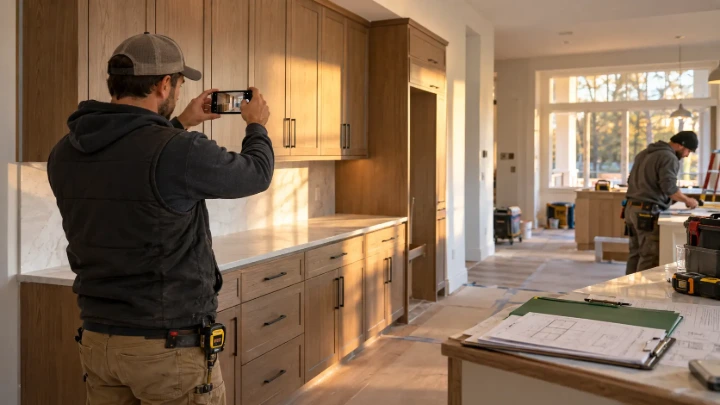
1. Confirm the Job and Reporting Period
Start with the basics: job name or number, location, date, crew lead, and the hours or shift being reported. This prevents photos and notes from being filed under the wrong project.
2. Record Work Completed
Use specific scope language. "Installed the north-wall cabinets" is more useful than "made progress in the kitchen." Note quantities, areas, phases, or milestones when they matter.
3. Capture Issues and Delays
Report anything that affects cost, quality, timing, safety, or the next trade. Examples include concealed damage, a failed delivery, missing access, weather, an inspection delay, or work that differs from the approved scope.
Do not wait until the end of the week. A same-day issue is easier to document and resolve while the facts are fresh.
4. Log Customer Questions and Requests
A customer request is not automatically an approved change. Record what was asked, who asked, when it was discussed, and whether work has paused pending review.
This protects the customer and contractor from relying on different versions of the conversation. It also supports a cleaner change order tracking process.
5. Attach the Right Photos and Documents
Photos should show something useful: completed work, concealed conditions, measurements, damage, delivered materials, or the condition of the site. Add a short label so the office does not have to guess what each image proves.
Receipts, delivery slips, inspection notices, and signed acknowledgments should be attached to the job record instead of living in a camera roll or truck console.
6. State Tomorrow's Plan
List the next work area, expected crew, scheduled delivery, inspection, subcontractor, or customer decision. A short forward-looking note helps the office protect the schedule and communicate accurately.
7. Assign Office Actions
Finish the handoff with explicit requests. For example:
- Call the customer about the revised arrival window
- Price and prepare a change order
- Order two additional fixtures
- Schedule the inspection
- Upload the receipt to the job cost record
- Create a follow-up task for the project manager
- Prepare the milestone invoice
Every action should have an owner and, when useful, a due date.
A Copy-and-Use Contractor Field Handoff Template
Job: [Job name or number]
Date and crew lead: [Date] / [Name]
Completed today: [Specific work, area, quantity, or milestone]
Issues or delays: [What happened and the effect on cost, quality, or schedule]
Customer questions or requests: [Request, person, time, and current status]
Photos and documents: [What is attached and why]
Materials or approvals needed: [Item, quantity, vendor, decision, or deadline]
Plan for tomorrow: [Work area, crew, delivery, inspection, or dependency]
Office actions: [Action + owner + due date]
How the Office Should Process the Handoff

Collecting the update is only half of the workflow. The office needs a short review routine so reports do not become another unread inbox.
- Review new handoffs at a consistent time each workday.
- Update the project status, schedule, and next milestone.
- Create tasks for purchasing, approvals, customer communication, or billing.
- Move change requests into the formal estimating and approval process.
- File photos and documents against the correct job.
- Escalate safety, scope, cost, quality, or schedule risks promptly.
- Confirm that urgent actions have an owner.
For larger teams, define which items require immediate escalation and which can wait for the daily review. That keeps the office responsive without turning every field message into an emergency.
Common Handoff Mistakes to Avoid
- Using group texts as the permanent record: messages are hard to organize by job and easy to lose.
- Sending unlabeled photos: an image without context may not support a decision, invoice, or change order later.
- Reporting only problems: completed work and milestones matter for scheduling and billing.
- Doing extra work before approval: document the request and follow the approved change process.
- Leaving office requests implied: state the exact action, owner, and timing.
- Waiting until Friday: delayed reporting makes daily decisions depend on stale information.
- Building a form that is too long: capture the minimum facts the office will actually use.
How SupportCrewe Helps Connect the Field and Office
Contractor operations get harder when field updates, customer calls, schedules, documents, and billing triggers live in separate places.
SupportCrewe helps contractors organize the administrative workflow around the job. Depending on the selected service scope, that may include project coordination, document organization, customer communication, scheduling support, task follow-up, invoicing support, and keeping job records current.
The purpose is to help the contractor's team spend less time hunting for information and more time acting on a reliable job record.
Odoo Partner Insight: Turn Field Updates Into Workflow
Odoo can support a structured field-to-office handoff by connecting project tasks, field service visits, documents, timesheets, approvals, sales orders, change requests, and invoices.
A useful configuration can give the crew a consistent update form while allowing the office to create activities, change a project stage, store evidence, notify the right person, or prepare billing from the same job record.
Automation should support the process, not hide a weak one. Define the required fields, stage rules, owners, and escalation points before building alerts or dashboards.
SupportCrewe offers Odoo setup, workflow configuration, training, maintenance, and managed contractor support within the approved service scope. Odoo licenses and seats are separate and paid directly by the client. Developer-level customization is separate from standard implementation and support.
BookACrewe Partner Tip: Reliable Communication Builds Trust
Visibility may help a contractor get considered, but the customer experience shapes what happens next.
A contractor who documents progress, communicates changes clearly, and closes loops between the jobsite and office is better positioned to deliver a consistent experience. Keep business details and service information current on contractor profiles, then make sure the operation can support the expectations that visibility creates.
Frequently asked questions
Here are some common questions about our company.
It is a repeatable process for transferring field progress, issues, photos, customer requests, documents, and next actions to the office so the job record and workflow stay current.
Daily reporting works well for active multi-day jobs. Short service calls may be updated at completion. Urgent safety, cost, scope, or schedule issues should be escalated immediately rather than waiting for the routine handoff.
Keep photos that document conditions, completed work, damage, measurements, deliveries, hidden work before it is covered, and other details needed for quality control, customer communication, change orders, or closeout.
Yes. Record the request, who made it, and the current status. A request should still follow the contractor's formal pricing, approval, and change order process before extra work proceeds.
Odoo can route structured updates, create activities, store documents, and connect project progress to other records when configured correctly. Clear process rules and accurate team input remain essential.
Start With One Reliable Daily Update
You do not need a long report or another meeting. You need one short handoff that the field can complete and the office can act on.
Choose the seven fields. Set a daily deadline. Decide who reviews the update. Then turn every important issue, request, and next step into an owned action.
SupportCrewe contractor support
Build a clearer path from the jobsite to the office
Organize field updates, customer communication, documents, schedules, and follow-through in one workable contractor process.